[This page has been machine-translated.]
Index card
To open a person's profile card, double-click the person in a directory with the left mouse button. Contents
The index card consists of the following six sections:
- Menu bar
- Personal input fields
- Marriages
- Children
- Switching between data and documents
- status bar
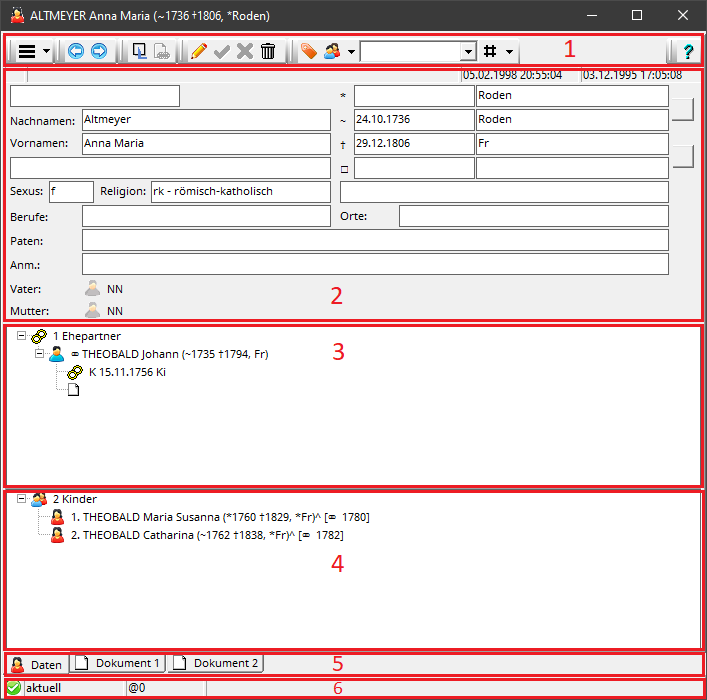
References to father, mother, spouse, and children are underlined when you hover the mouse cursor over them. A simple left-click opens the record of the linked person.

The menu bar at the top contains the following functions across six strips:
- drop-down menu

- navigation
- Back/Forward: Navigation through the history of viewed people
- Sources, links, information
- Edit
- Switch the index card to edit mode; keyboard shortcut Ctrl+E .
- Save edits; keyboard shortcut Ctrl + S . With the setting General | Auto Save in the Omega data entry settings, each tab is automatically saved when editing links, before exiting, and before calling functions. This corresponds to the behavior of Omega Classic.
- Discard and cancel editing; keyboard shortcut Ctrl+Q
- Delete person
- Identification and directories
- Help
- ?: Display this help page; Keyboard shortcut Ctrl+H ( Ctrl+H )
editing
To edit the person's record, you must first switch the record to edit mode by clicking on the pen icon in the menu bar at the top. The setting "General | Permanent Edit Mode" in the Omega data entry settings allows each record card to be automatically kept permanently in edit mode. This corresponds to the behavior of Omega Classic.
In edit mode, the input fields for the person, the editing of marriages , the editing of children and the editing of documents are enabled.
The keyboard layout is summarized in the Keyboard Layout section.
Click the green check mark in the menu bar to complete editing and save the changes, or the red cross to discard the changes and restore the original state.
The "General | Auto-save" setting in Omega's preferences allows you to specify that changes to the card do not require user confirmation. They will then be saved automatically before links are created, another person is displayed, or the card is exited. This corresponds to the behavior of Omega Classic.
Edit links
Right-click in the Marriages field (3) or in the Children field (4) to edit the links to marriages or children . To remove the link to a parent, add a new person as a parent, or select a person as a parent, right-click the father or mother icon below the input fields (2) and select the desired function from the context menu. Selecting a parent will display the same dialog box as when editing the link to a child .
References
Keyboard layout