 -Searching for the menu of the index card .
The search for duplicate entries in a specific directory is performed via the "Duplicate Check" menu item in the directory's context menu . Duplicates for a specific person can be found via the "Duplicate Check" menu item in the person's context menu when viewing the directory's details , or via the "Duplicate Check" menu item from within the directory. -Searching for the menu of the index card .
Unless automatic duplicate checking is disabled in the Omega data entry settings , an automatic check is performed before saving a newly created person to determine whether the newly created person is a potential duplicate of an already recorded person.
The procedure does not use the exact names of the persons included in the examination, but rather their phonetic equivalents, in order to identify, for example, SCHMITT Francisca and SCHMIDT Franziska as possible duplicates.
To compare two people, a similarity score is determined, which is higher the more similar the two people are. For example, matching dates lead to an increase in the similarity score, while contradictory dates lead to a decrease.
If the similarity score reaches or exceeds the threshold set in the Omega search and check settings , the individuals are identified as duplicates. A higher threshold results in fewer potential duplicates being detected, while a lower threshold produces more false positives.
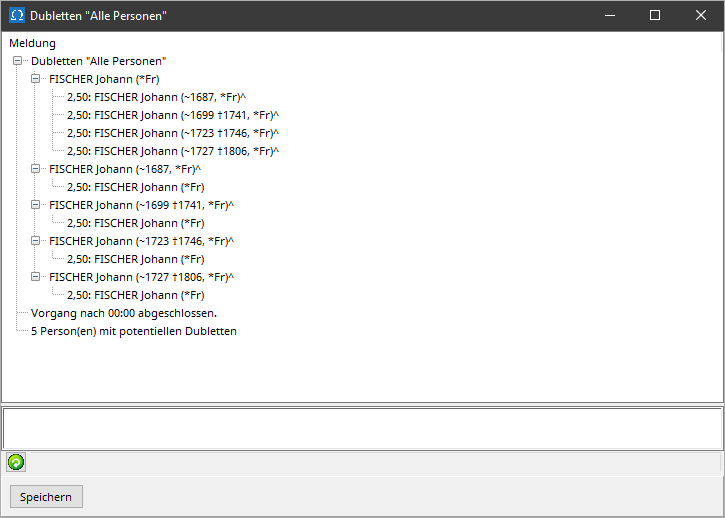
In addition, a list of persons called duplicates "..." is created, which records all persons for whom at least one sufficiently similar other person exists in the file.
To investigate and, if necessary, correct the identified inconsistencies, proceed as follows:
-Open the index card menu to view the specific exam result for the selected person. in the menu bar of the index card , to remove the person from the duplicate entries in the person directory and thus from your worklist as completed.