[This page has been machine-translated.]
Children edit
To edit a person's children, the record must be in edit mode.
Create, modify, and break links
You can only add children to people of either the male or female gender. If you right-click in the children's field on the index card , you can select from the context menu whether you
- remove an existing child,
- Change your assessment of the link as certain, suspected, or questionable, or
- edit the link to its parents or
- add a child
want. The position of the mouse pointer when clicking determines the child or the insertion position. If you select "Edit Parents" , the following dialog box will appear:
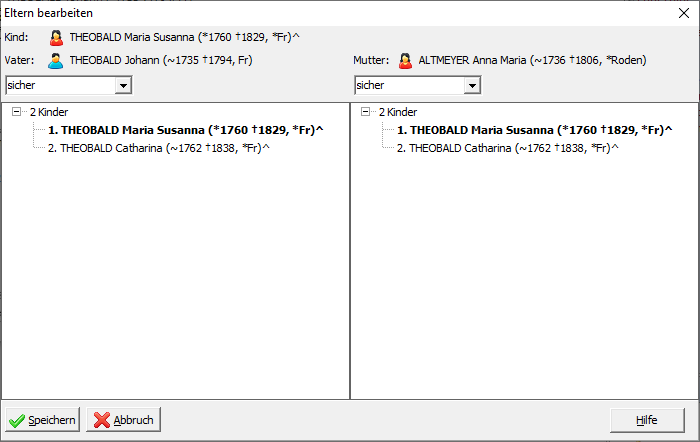
Right-clicking on the father or mother allows you to remove the link to that parent or select a different person as the parent. In the selection boxes, you can indicate whether you consider the relationship certain, suspected, or questionable.
Under the father and mother, all children of those parents are listed. The child whose parents you are editing is highlighted in bold in the respective list. You can also change the order of the children for both the father and mother by dragging and dropping them with the left mouse button.
Change order
If you have more than one child and click and hold the left mouse button on a child, you can drag the child to a different position. Releasing the mouse button moves the child to the new position. This allows you to change the order of children after the fact.
Sort chronologically
If you right-click on the "Children" heading, you can select "Sort children automatically chronologically" from the context menu . The sorting process sorts the children by their birth dates, or, if no birth dates are available, by their baptismal dates. If a child lacks both a birth and baptismal date, they are sorted to the beginning. The "before ," " at ," " after ," and "between " entries for birth and baptismal dates are ignored during sorting. After sorting, you will be asked if you also want to sort the children chronologically by their other parent. This prompt appears regardless of whether a child has another parent linked to them, or whether the sorting process actually changed the order. Read here how to automatically sort the children of all people in a directory at once.