[This page has been machine-translated.]
Lists of persons
Overview of the lists of persons
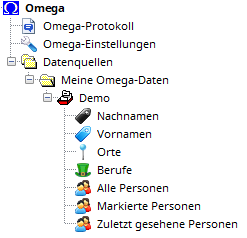
Typically, at least the automatically generated and updated directories "All People" , "Tagged People" , and "Recently Viewed People" are present ( automatic directories ). All other person directories are created by the user ( user-created directories ).
Working with lists of persons
If you right-click on a person directory in the tree view of the AGS Navigator, you can select the following functions from the context menu:
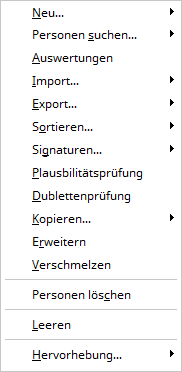 |
- New ...
- People are looking for...
- New query : Search for people , starting with a blank input form.
- Previous query : Search for people , where the input form is pre-filled with the search terms from the previous search query.
- Evaluations : create an evaluation based on the list of persons
- Import...
- Export...
- Sorting...
- Signatures...
- List : List and count the signatures of the persons contained in the directory.
- Replace : Replace signatures of persons contained in the directory according to a specific scheme.
- Plausibility check : Perform a plausibility check for all persons in the directory.
- Duplicate check : Perform a duplicate check for all persons in the directory.
- Copy : Create a newly sorted copy of the directory ; select the sorting in the submenu.
- Expand : Optionally expand the directory to include spouses, non-marital partners, parents, and children of the persons included in the directory (not applicable to the " All Persons " directory).
- Merge : Drag the People directory onto another People directory while holding down the left mouse button to add its contents to the other directory (not applicable to the All People directory).
- Delete people : deletes all people in the people directory.
- Regenerate : only for the directory. All people : the directory will be recreated.
- Clear : only for the directories "Tagged People" and "Recently Viewed People" and user-created directories: the directory is cleared ; the people are retained.
- Rename : only for user-created directories : the directory will be renamed (keyboard shortcut F2 )
- Remove : only for user-created directories : the directory will be removed; the users within it will remain.
- Visual highlighting of the person directory in the AGS navigator to make it easier to find.
|
Working with directories of persons
Opinion
If you click on the person directory in the tree view of the AGS navigator with the left mouse button, the persons contained therein will be displayed as person references in the detail view:
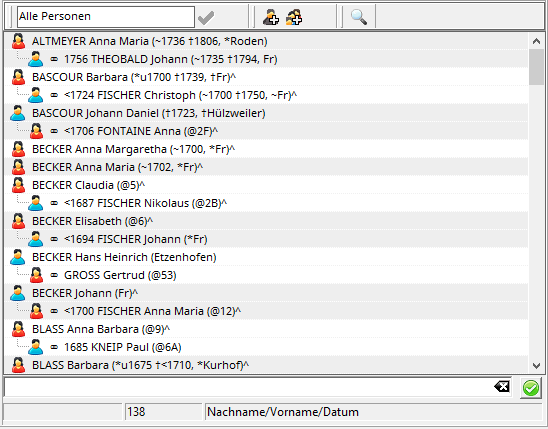
Each line lists one person. Married individuals have their spouses shown indented below.
If the mouse pointer hovers over an entry, a notification window opens and displays more detailed biographical data about the person, if available.
Menu bar
You can change the name of a user-created directory in the input field in the menu bar above the list of people. The change takes effect when you left-click the green check mark. Left-clicking the person icon with the plus sign above the list creates a new person . Left-clicking the family icon with the plus sign creates a family group with a father and mother as new members and links them in one step.
You can use the magnifying glass to search for people in the directory, with the input form pre-filled with the search terms from the previous search query.
Functions involving people
Double-clicking an entry with the left mouse button will open the person's record card . If you right-click on a person in the tree view of the AGS Navigator, you can select the following functions from the context menu:
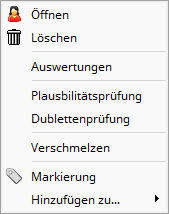 |
- Open : the person's file card is opened.
- Delete : the person will be irrevocably deleted.
- Evaluations : create a person-based evaluation
- Plausibility check : Conduct a plausibility check for the person.
- Duplicate check : Perform a duplicate check for the person
- Tagging : toggles the tagging of a person on or off and adds or removes the person from the "Tagged People" directory.
- Add to... : adds the person to another directory (check box) or removes the person from a directory (uncheck box).
|
Copying and moving people
Drag a person with the left mouse button held down to another person directory, then release the mouse button to move the person to the other directory. The person will then be included in the other directory but no longer in the original person directory. If you drag the person while holding down the Ctrl key, they will be copied to the other directory. The person will then be present in both this and the other directory.
This also works with multiple people by first selecting them: clicking with the left mouse button while holding down the Ctrl key selects individual people, and clicking the first and last person in a row with the left mouse button while holding down the Shift key selects all people in between. The latter can even be combined with individual selection.
If you copy or move one or more people to a person directory in another file in this way, the people will be copied to the other file ( Omega transfer ).
Quick search
The search field below the list allows you to quickly find a person. If you enter the beginning of the last name and press Enter, the directory will scroll to the first person whose last name begins with the entered string. Within the same last name, you can also search for a first name by typing the first name (just the beginning) after the complete last name (separated by a comma if necessary). For example, entering RICK will find RICK, Adam or RICKMEYER, Adam if no name RICK is found in the directory. RICKMEYER, G will advance the search to RICKMEYER, Georg .
Searching for ? (question mark) will take you to the end of the directory, where people without a last name are listed with NN .
Case sensitivity is ignored except for surnames in special situations: if the first letter of the same surname is lowercase and then followed by an uppercase letter, the first part is assumed to be a prefix. Entering "Kneip" and "kneip" will both find "Kneip" , entering " de_Haen " will find "de_Haen" , and entering " de_haen" will find "Dehaen " but not "de_Haen ".
If you add a number to the end of the search, the system will search for the first person with that name who is listed according to the entered year or date.
Examples of entries in the quick search field:
- RICK, G
- rick g
- Schmitt Anna 1800
- Peter
- ?,Peter
- Carl von Aachen
- mueller, peter, 17801202
This search method is only possible in directories of persons that are sorted by last name/first name/date. In directories of persons sorted by Kekulé number , you can search for the Kekulé number in the quick search field.
reference
Move / copy directory contents