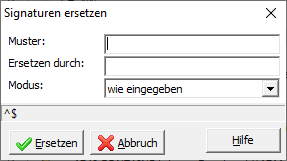
Depending on the mode setting, there are three ways in which the string entered in the pattern field is used when searching for the signature to be replaced:
In Regular Expression search mode, you can create character groups within the pattern using parentheses, which you can then reuse during the replacement process. The reuse of found character groups is indicated by the symbols $1 , $2 , etc. These symbols reference the parenthesized expressions in the pattern, numbering from the outside in and from left to right.
Example: You use the letter A followed by a number as your signature, e.g., A4711 or A620 . To replace the letter A with Kb in all signatures of this type while keeping the number, enter ^A(\d+)$ as the pattern and replace it with Kb$1 . ^ represents the beginning and $ the end of the signature, so that only signatures that completely match the pattern A(\d+) are found. \d+ represents one or more digits. The parentheses define a group of characters that is referenced again by $1 during the replacement. For the signature A4711 , 4711 is referenced again and appended to Kb , resulting in Kb4711 .