[This page has been machine-translated.]
CSV export of directory contents
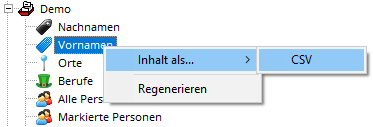
From the context menu of a directory , you can export the contents of the directory as a CSV file as follows:
- In the navigator, right-click on the directory in the tree view. The context menu will open.
- Select "Content as... | CSV" from the context menu . For directories of people, select "Export | CSV | People" instead.
- The generated CSV file will open in the document viewer , where you can view or save it.
The CSV file contains one line per directory entry, with fields separated by semicolons. You can open the saved file in a spreadsheet program (Excel, LibreOffice Calc) to further process the information it contains.
References
CSV export of files