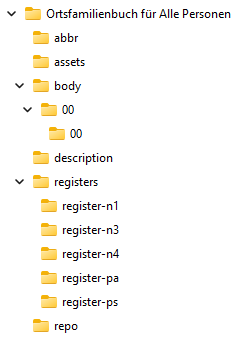
Extensive analyses, such as local family registers or ancestor lists, often result in large files ( example ). The HTML splitter breaks down such monolithic files into individual, interconnected sections and adds numbered navigation for numbered analyses , creating a kind of website ( example ).
The HTML splitter only works for reports created with AGS/Omega version 2.8 or higher.
The HTML splitter is called from the context menu of the entry for the monolithic HTML file.
First, you will be asked for the folder where you want to create the HTML output. Within this folder, the HTML Splitter creates a subfolder containing the HTML output, named after the monolithic HTML file you want to split. If the subfolder already exists, it will be deleted along with its contents after a confirmation prompt before being recreated.
Documents in Omega can contain links to files on drives (e.g., photos, scans of certificates). These linked files are no longer accessible from the HTML output if the HTML output is transferred to another computer, such as a web server on the internet. Therefore, it is advisable to copy the linked files directly into the HTML output. You will be prompted to do so during the workflow.
After the HTML output has been successfully generated, the program will ask you whether you want to view the generated HTML output, open the folder it contains, or end the process.
Example HTML output in Windows Explorer: