[This page has been machine-translated.]
Document manager
Purpose
The document manager is used to manage documents. A list of documents created by Omega is displayed here. You can also add other documents to the list. Documents created with Omega include, for example, results of plausibility checks and duplicate searches, GEDCOM files, GEDCOM import and export logs, and reports . Documents that you add yourself are any files located on drives connected to the computer.
The media type (Internet Media Type) of a document indicates what kind of document it is (e.g., RTF file or Omega report). A document is also encoded in a specific format (e.g., OEM437 for DOS files or UTF-8 for GEDCOM files).
The document manager itself does not store any documents, but merely refers to the storage locations of the documents it manages on your hard drive.
structure
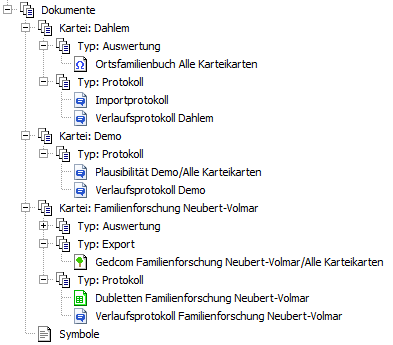 |
The document manager arranges the documents it manages in a tree structure. The tree can be structured hierarchically. The organizational categories are file, type, and evaluation type (for documents of the Omega evaluation type). In the document manager settings , you determine the displayed structure by specifying the number and order of the categories. The default is a single-level structure organized by file. The image on the left shows a structure organized first by file and then by document type. For example, organization by type and evaluation type is also possible. All documents generated by Omega are categorized. Documents that you add to the document manager yourself are assigned the values of the categories of the outline entry under which you insert the document. The symbol before the document name indicates its media type . If a sad face is displayed as the symbol, then the file to which the entry refers no longer exists on the drive. |
Details
| The detailed view displays the administrative information for the currently selected document in the tree. Depending on whether you can edit the information or not, the icon will show a pencil or not. Details are displayed in the tab.
- the filename of the document,
- the creation date and the date of the last modification,
- the media type ,
- the coding ,
- the properties of RTF files and
- The format description for CSV files.
|
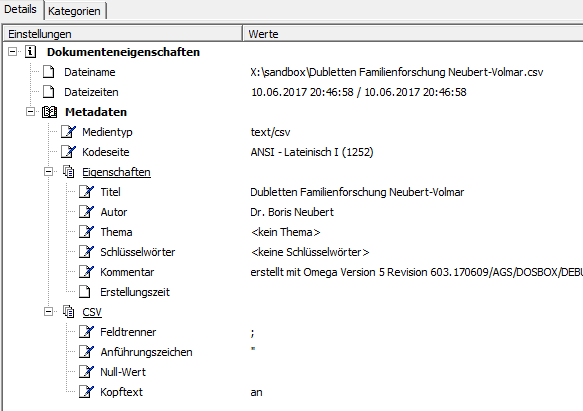 |
When you change information, only the interpretation of the document changes, not the file itself. For example, no conversion takes place when you change the media type, and the file is not re-encoded when you switch the code page. Changing the code page may be necessary if the document manager does not correctly recognize the code page of a document you have added—you can recognize this, for example, if umlauts are displayed incorrectly in the preview or the document is just a jumble of letters. Documents created by Omega are always identified with the correct encoding. The Categories tab displays the categories assigned to the document and their specific characteristics.
functions
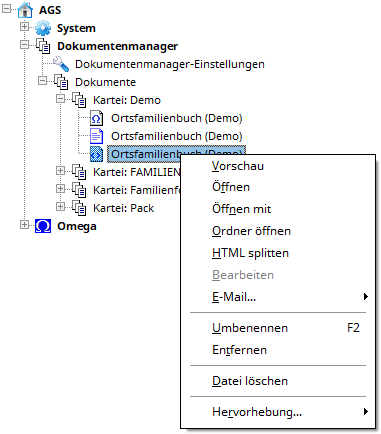 |
From the context menu of a document entry, you can execute a number of functions:
- Preview opens the preview with the option to print preview, print, and output the document as a PDF.
- Open opens the document with the program that Windows uses by default. Open with lets you choose the program.
- "Open folder" opens the folder containing the document in Windows Explorer.
- HTML splitting breaks down an evaluation created with Omega (see HTML splitter ).
- Edit opens the document for editing in the editor (text files only).
- Email... allows you to send the document either as an attachment to an email or in the body of an email.
- Renaming changes the name under which the document is displayed in the document manager (not the file name).
- The "Remove" option removes the document from the list. The file itself is not deleted and remains on the drive.
- Delete file removes the file from the drive.
|
From the context menu of an outline entry, you can also add a document to the outline or remove all missing entries, i.e., those where the file no longer exists.