[This page has been machine-translated.]
Local family register
At the end of this chapter you will find tips on how to create a local family history book. Introduction
The local family register is generated from the individuals in the user-selected index within a single file. The local family register is a numbered evaluation format . The family section of a local family register consists of consecutively numbered family blocks . The sorting of families within the family section is determined by the sorting of the underlying index ( see tips ).
Extras
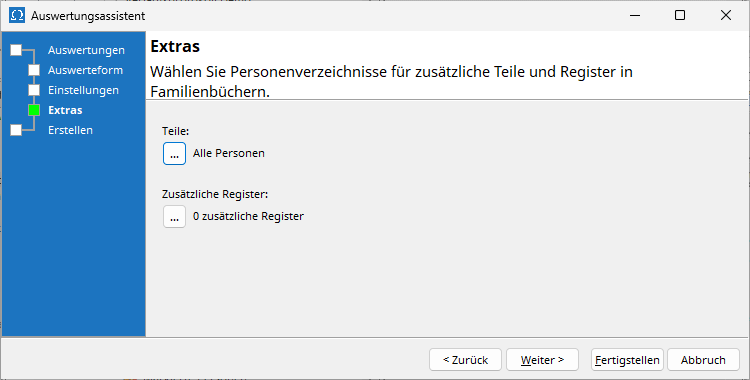
For master lists and extended master lists, there is an additional page called Extras in the evaluation assistant :
Multi-part local family books
On the Extras page, you can select additional parts for a multi-part local family register. Multi-part local family registers are based on more than one list of persons in the same card index (it is not possible to create a single local family register from the data of multiple card indexes). In addition to the list of persons selected when the evaluation assistant is launched, you can select additional lists of persons. A family part is then created in the local family register for each list of persons. All family parts share the common consecutive numbering and the indexes. An exemplary use case for multi-part local family registers is the recording of persons who died in a local military hospital, e.g., soldiers, who are not related to the inhabitants of the town being surveyed. The actual inhabitants and those who died in the hospital are then kept in two separate lists, which form the basis for the family sections in the local family register.
Additional registers
On the Extras page, you can select lists of persons from the same card index (it is not possible to create a single local family register from the data of multiple card indexes) for additional registers . Each list of persons will create an additional register in the local family register containing the persons listed therein. One example of an additional use case for registers is emigrant lists. For this, you maintain a separate register of persons titled "Emigrants" and select this register for an additional register, which is then displayed under the heading "Emigrants" in the registers of persons in the local family register.
Selection of the lists of persons
By clicking the button ... for parts or Additional tabs, you open the selection dialog for personnel directories:
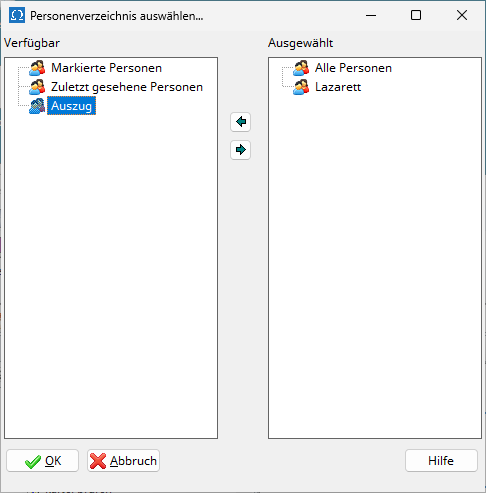
In the left-hand list of person directories, select a directory by clicking on it and then add the selected directory to the selection using the → button. Similarly, you can deselect a selected directory in the right-hand list by clicking on it and using the ← button.
The order in the local family register corresponds to the selected order in the right-hand list.
Selection of families
Introduction
In order for a family block to be created for a person in the local family register, their signature must conform to a predefined signature scheme and certain selection rules must also apply. The user controls which individuals in the underlying directory are eligible to form a family block through the concept of signatures and matching signature schemes ( see Tips ). A signature can be entered for each individual. If this signature conforms to a predefined signature scheme (see Omega settings under Omega | Reports | General | Include signatures ), the necessary condition for the individual to form a family block is met. The rules for determining whether a person's signature conforms to the signature scheme are described in the subsection " Control via Signatures" .
Beyond the matching signature, there are additional sufficient conditions that depend on the family constellation of the person with the matching signature. These sufficient conditions are described in the section Selection Rules .
Control via signatures
Local family registers are created on the basis of a list of persons and a signature scheme. The signature scheme is set in the Omega settings under Evaluations | Evaluation Forms | Local Family Register | Include Signatures . A signature scheme is a pattern for signatures. The signature scheme N* , for example, represents the letter N followed by any remainder. Index cards whose signature begins with N will match this pattern, but not those whose signature is empty or begins with a different character.
The signature scheme allows the use of wildcard characters, which stand for a group of characters:
| joker |
Meaning |
position |
| ? |
exactly one sign |
everywhere |
| @ |
exactly one letter |
everywhere |
| # |
exactly one digit |
everywhere |
| * |
any string or nothing |
everywhere |
The OR operator of signature schemes is a signature scheme that corresponds to a signature that matches at least one of the two signature schemes linked by a vertical bar ( | , ASCII code 124, usually present on German keyboards). For example, both signature A and signature N correspond to the signature scheme A|N (read: A or N ).
The following are some examples of signature schemes:
| Signature scheme |
Meaning |
Appropriate signatures |
N |
Signature is N |
N |
N* |
Signature begins with N |
N234.2 , NU66 , Nord , N-3 |
*N* |
Signature includes an N |
N234.2 , AN22 , 27NA |
*A*B* |
The signature includes an A and a B , where the A must come before the B |
AB , LAUB , 32A213G6B1 |
AU#### |
Signature begins with AU , followed by exactly 4 digits. |
AU1234 , AU0001 , AU9876 |
#L#* |
Signature begins with a digit, followed by L , a digit, and any remainder. |
1L223.8 , 2L2 , 8L4b |
K@* |
Signature begins with K , followed by a letter and any remainder or nothing. |
KA , KB-Nord , KF31 |
N1*|N2* |
Signature begins with N , followed by 1 or 2 and any remainder or nothing. |
N1 , N2a , N1000 , N2999 |
A|B# |
Signature is A or signature is B followed by a number |
A , B1 , B9 |
Please note that the signature scheme set under Evaluations | Evaluation Types | Local Family Register | Exclude Signatures does not exclude individuals with matching signatures, but merely displays these individuals with reduced information. This is useful if a previous local family register was already created from the card index using this signature scheme, and the current local family register, for space reasons, should only mention the individuals already described in detail in the earlier register.
Signatures can be a maximum of 10 characters long, signature schemes can be of any length.
Selection rules
The following describes the rules used to determine whether a person with a signature matching the specified signature scheme establishes their own family block. The phrase "person matches" means that the person is listed in the underlying directory of persons and their signature conforms to the specified signature scheme. The underlying list of persons is checked person by person in the order specified by the sorting.
Algorithm: predefined
Set the algorithm (see Omega settings under Evaluations | Evaluation formats | Local family register | Algorithm ) to predefined if you want full control over which individuals create their own family block. If a person's signature matches the signature scheme, a family block will be included for them in the local family register. In other words, you select precisely those individuals whose families should appear under their own numbers in the local family register. Algorithm: dynamic
Set the algorithm (see Omega settings under Evaluations | Evaluation Types | Local Family Register | Algorithm ) to dynamic if you want Omega to control which individuals form their own family block. If a person's signature matches the signature scheme, a family block will be included in the local family register if the following criteria are met, depending on gender:
- Male persons
- Person has at least one marriage, or
- Person has at least one child, or
- The person has no parents or their parents are unsuitable.
Rule 1c ensures that individuals without any connection to other people also appear in the local family register. - Female persons
- The person has at least one child whose father is not recorded, or
- Person has no parents or their parents are unsuitable
Rule 2b does not apply if
- at least one marriage exists with a man who appears in the local family register, or
- at least one extramarital relationship exists with a man who appears in the local family register.
Rule 2a ensures that children listed there without a known father appear somewhere. The addition to Rule 2b ensures that female individuals do not appear unnecessarily often in the local family register. - Neutral persons
- The person has no parents or their parents are unsuitable.
Selection of children
In the default setting , under Evaluations | Evaluation Types | Local Family Register | Only signed children in the Omega settings, the children block always displays all children of the person who founded the family block. With the setting enabled, only those children whose signature matches the signature scheme appear in the children block. Reduced entries
If a series of local family registers is compiled from the same card index, the same individuals may appear in more than one register. In each register, the complete available information would be provided. Assuming the reader has access to all registers in the series, it is advisable to omit or abbreviate the entries of individuals who have already appeared in an earlier register in a later one. The individuals to be omitted can also be determined using a call number system. For example, if persons with signatures A and B have been recorded and a local family register has already been created based on signature scheme A , the signature scheme B can be set in the settings for the second local family register under "Include signatures " and signature scheme A under "Exclude signatures" in order to select the persons with signature B for the local family register and to suppress or abbreviate persons with signature A
Tips
Sorting of families
- By default, the person indexes in Omega are sorted by last name/first name/date. However, local family registers are usually sorted by last name/date. To create local family registers sorted in this way, you must first create a copy of the "All Index Cards " person index sorted by last name/date and then use this copy as the basis for the creation.
- When recording individuals, a decision should be made as to whether to use a standardized lead name (e.g., always Schmitt for all spellings of this surname) when surnames have different spellings, in order to make it easier for readers of the local family history book to find specific individuals. The concept of lead names beginning with a period supports this approach.
Use of the signature
- In the standard use case for signatures, local residents are distinguished from non-residents by assigning a predefined signature to local residents during registration, while the signature for non-residents remains blank. If non-residents are then registered as the parents of a father who has moved to the town, these non-residents will be listed as parents in the father's family record – however, a separate family record (with its own sequential number) will not be generated for the parents.
- The call number can also be used to divide the personal data of a card index into two or more sub-collections. This division can be based, for example, on districts or historical periods. For this purpose, call numbers are chosen that can be separated using call number schemes. In the simplest case, in addition to empty call numbers for those from outside the area, call numbers
A and B are selected.
- To generate two family registers from the same card index, corresponding to two consecutive periods, residents of the first period (e.g., before 1815) are marked with
A , and residents of the second period (e.g., 1816–1899) with B , while the mark for non-residents remains blank. An analysis using mark scheme A then yields a local family register for the first period, an analysis using mark scheme B yields one for the second, and an analysis using mark scheme A|B ( A or B ) yields a local family register for both periods simultaneously. - A similar approach can be used if, at the beginning of the data collection process, one wishes to retain the option of creating either a separate local family register for each district or a single, more comprehensive local family register for all districts of a town. In the case of five districts, residents are assigned one of five identifiers
A through E according to their district affiliation. To then create a local family register containing the residents of the first three districts, these are selected using the identifier scheme A|B|C .
Post-processing
Information on extended support for the HTML format for local family registers can be found in connection with the HTML splitter .