[This page has been machine-translated.]
Settings
Settings are arranged in a structured manner in the detailed view, as can be seen here using the Omega settings as an example:
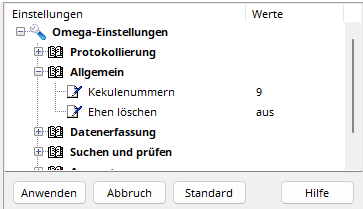
Left-click the value in the right-hand column to change the corresponding setting. Right-clicking a setting or heading opens the setting's context menu. This menu typically contains an entry to restore the default value for the setting or group of settings (all settings located in the tree structure below the clicked entry). The "Default" button at the bottom restores the default values for all settings. The values of settings that have been changed are highlighted in red. Clicking the Save button will permanently apply the changes. Clicking the Cancel button will undo the changes.
reference
Save/restore settings
Moving a program between computers