[This page has been machine-translated.]
Open file
To edit entries in the integrated user interface, expand them below the record in the AGS Navigator. To do this, either left-click the plus symbol next to the record in the AGS Navigator or select "Open (integrated)" from the record's context menu in the AGS Navigator.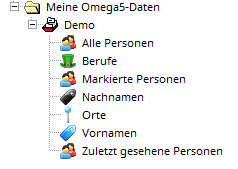
If a record is opened in the classic user interface to use certain functionalities, it cannot be opened again, neither in the classic nor in the integrated user interface. Therefore, the record's detail view will display "Open in Omega Classic" .
References
Omega user interfaces